
There are two types of Platform instances which each require separate whitelisting
-
Local platform instance, on-premise server
-
Cloud platform instance, cloud instance with IP and domain name in the form of {customername}.platform.cloud.pozyxlabs.com
If you are using the Platform with our UWB RTLS, please see this page for the RTLS networking info RTLS networking info
Platform server interfaces
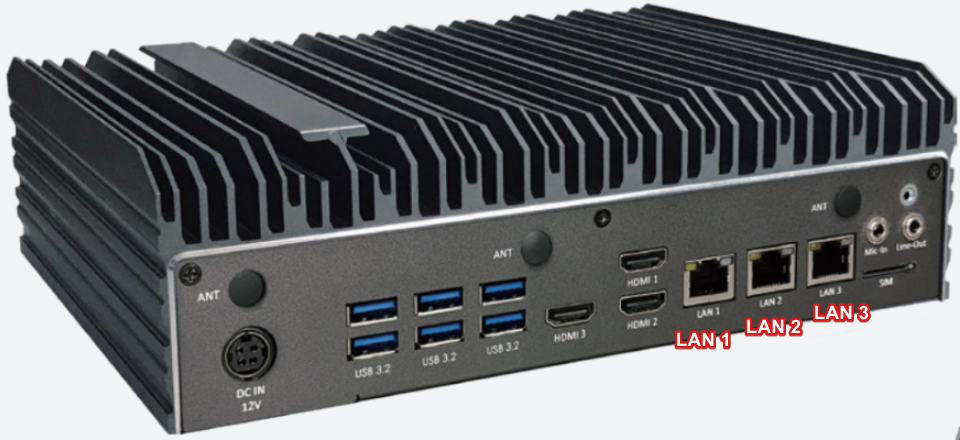
This is the port layout of the server:
-
LAN1
Uplink network connection, can be configured as:-
Receive an IP from DHCP (default behavior)
-
Static IP on request
-
-
LAN2 + LAN3
Service ports, on this network a DHCP server is running. A connected device will receive an IP from the 10.0.0.254/24 network. The server has a static IP address of 10.0.0.254
Network requirements local server
-
Time synchronization NTP (port 123)
For a local server, likely a local NTP server will be used. It’s also possible to whitelist an external NTP server. -
Domain name resolution DNS (port 53)
For a local server, a local DNS server is required to resolve the systems domain name. Alternatively, all users have an entry in their hosts file https://www.whatsmydns.net/hosts-file.html -
OpenVPN remote support (port 1194)
This port should only be opened for IP 34.247.139.22 in order for Pozyx engineers to give remote support. Alternatively, different access methods such as a different VPN tool or remote desktop can be used if provided. -
Web application HTTPS (Port 443)
When deployed locally, HTTPS may not be enabled by default unless configured explicitly. For secure deployments:-
Use a reverse proxy (e.g., Nginx) to enforce HTTPS locally.
-
Issue and install a valid TLS certificate (self-signed or CA-issued).
-
We can issue a self signed certificate (default)
-
-
Web application HTTP (Port 80)
Used if HTTPS is not enabled (See 4.) -
Keycloak login and authorization (port 443)
Used irrespectively of whether the web application used HTTP or HTTPS -
Platform software updates (port 443 externally)
We prefer to update a local platform using an internet connection to pull the software. For this to work whitelist:-
ecr.cloud.pozyxlabs.com
34.243.118.148
52.31.30.1
52.209.4.58 -
https://api.ecr.eu-west-1.amazonaws.com/
More information can be found here:
https://docs.aws.amazon.com/general/latest/gr/ecr.html
The ECR storing our container images uses an Amazon managed S3 bucket in the background. If this is not allowed or additional inspection is required, we can install your ZScaler root certificate on the device
-
-
RTLS - Platform server communication (port 2100)
RTLS server will connect to the platform server using port 2100
Network requirements cloud server
-
Web application HTTPS (Port 443)
When using a cloud platform, the application will always be running on HTTPS with a valid certificate. -
Keycloak login and authorization (port 443)
Whitelist keycloak.cloud.pozyxlabs.com
34.243.118.148
52.31.30.1
52.209.4.58 -
Notification service (port 80)
Whitelist cnd.cloud.pozyxlabs.com
34.243.118.148
52.31.30.1
52.209.4.58